How to Setup the Zoho Desk Integrator
Administrator Access Required:
To set up this integration, you will need administrator access to your Zoho Desk account and an Office Manager within the Nova Portal.
User Identity Matching:
Email Address Identification: The Nova Portal uses email addresses to identify users in Zoho Desk.
No Email Present? If a Nova Agent/User doesn't have an email address, the Zoho Desk administrator can add the user's extension number in Zoho Desk to enable identification.
For Step-by-Step instructions on adding the Extension Number to the Zoho Desk User please navigate to Step 7.
Setup Steps:
- Login to the Nova Portal
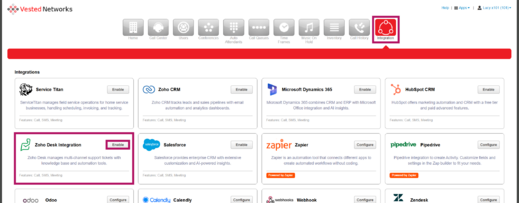
- Go to the Integration Tab in the Nova Portal and Select on the "Enable" Button on Zoho Desk.
- Login to Zoho Desk
- Accept the Connection
- Integration Successfully Linked
- Screen Prompt/Confirmation Message:
Integration Successfully Enabled, you can now close this window - Nova Integrator Status: Zoho Desk is now showing "Enabled" in the "Integrations" tab (button will change to blue).
- Icon Prompt:
Zoho Desk integrated succesfully
- Screen Prompt/Confirmation Message:
- Adding Users to the Integrator
- Hit the "Pencil" Icon located to the Left of the Enable Button
- Enable Users for Calls, SMS, and Meetings Data Logging by Selecting the Check Box under each Column
- In the "Advanced" is where the Tokens can be located (Please note: Any edits to this can affect the outcome of the task within Zoho Desk)
- Contact:
[[phone_number]] - Employee:
[[employee]] - Call Direction:
[[call_direction]] - Call Time:
[[call_start]] - Call Event:
[[call_event]] - Recording:
[[recording_url]] [[transcription]]
- Contact:
- Confirming the User's information in Zoho Desk/ Adding Extension Number
User Identity Matching: The Zoho Desk Nova Integrator uses email address identifications to verify the specific users/agents across the platforms to allow for the data to reach the correct agent. No Email Present? If a Nova Agent/User doesn't have an email address, the Zoho Desk administrator can add the user's extension number in Zoho Desk via the Extension Field. This Identification is critical for the Integrator to feed the data from the Nova environment over to Zoho Desk and associate it to the correct end user. The following instructions goes over how to verify or add the email or extension number to the Zoho Desk Us
- Going to Zoho Desk: Selecting Settings in the Top right and then Agents under User Management
- Search the User's to confirm email or extension number is under the User
- Select the Fields to add Email and/or Extension

If you have any questions about this process, or if you need assistance, please reach out to our Support Team by dialing HELP(4357) on your desk phone, calling (972) 924-6488, or submitting a ticket.