Managing Contacts in the Vested Soft Desktop App
Log In to the Desktop App
If you're having trouble logging in, please see our article here.
Filter Your Contacts List
- Open the desktop app and tap the Contacts tab on the left navigation bar.
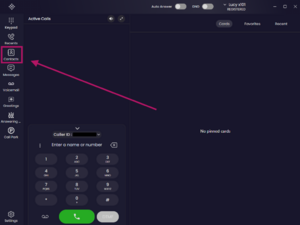
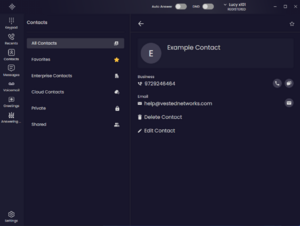
- On the left hand side of the Contacts screen, select one of the available contact filters. By default, the filter is set to All.
- Choose one of the following categories:
- All – Displays every contact from all available sources.
- Favorites – Displays contacts you've marked as favorites.
- Enterprise – Displays contacts shared across your organization.
- Cloud Contacts – Displays contacts synced from your Google or Microsoft 365 account.
- Private – Displays contacts you've created yourself.
- Shared – Displays contacts that have been shared with you.
- The Contacts list will automatically update to display only the contacts in the selected category.

Add a New Contact
- From the Contacts screen, tap the + icon in the upper-right corner.
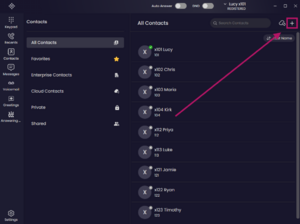
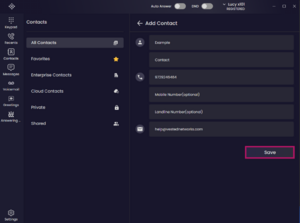
- Enter the contact's information as needed:
- First Name
- Last Name
- Work, Mobile, and/or Home phone number
- Tap the Save button in the bottom-right corner to save the contact.


View a Contact
- From the Contacts screen, tap a contact's name or profile to open their details
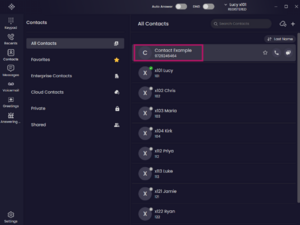
- From the contact details screen, you can:
- Tap tab the phone icon to place a call.
- Tap tab the message icon to send a message.
- Tap the contact's email address to open your device's default email app and compose a new email.
- Add or remove the contact from your Favorites.
- Edit the contact's information.
- Delete the contact if it is no longer needed


Notes
- Only enter the information that's relevant for the contact. At a minimum, a name is recommended.
- Newly created contacts will appear under both the Private and All contact filters.
- If a category displays a message such as "No Favorite Contact Found," it simply means there are currently no contacts assigned to that category.
If you have any questions about this process, or if you need assistance, please reach out to our Support Team by dialing HELP(4357) on your desk phone, calling (972) 924-6488, or emailing help@vestednetworks.com.