How to Setup the Zapier Integrator
Looking for different ways of automating processes such as lead creation, call data logging, SMS data logging, and call transcription data? Well, Zapier provides a low code/no code solution that provides simple ways of automating these processes in cases where your CRM doesn't have a direct integration within your providers portal.
Administrator Access Required: To set up this integration, you will need administrator access to your Zapier account and an Office Manager scope within the Nova Portal.
Setup Steps:
- Login to the Nova Portal
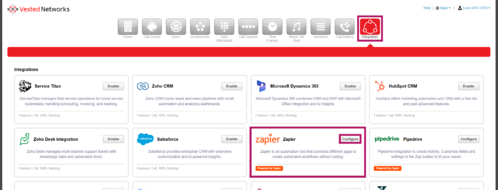
- Go to the Integration Tab and Select the Configure Button within the Zapier Box (This will pop up a new window to login and view prebuilt workflows to automating processes using some of the most popular CRM solutions)
- Select Login (This will pop a new window for the login process)
- Enter Login Credentials
- Once Logged in Create a Workflow, Turn On or Off Published Workflows, or Use Templated Workflows

If you have any questions about this process, or if you need assistance, please reach out to our Support Team by dialing HELP(4357) on your desk phone, calling (972) 924-6488, or submitting a ticket.