NOVA MFA

From Vested Networks
Revision as of 12:50, 3 November 2025 by Pcaveness (talk | contribs) (Created page with "# Log in to the User Portal. # Click on the '''Profile''' option in the user menu (top right of the screen). frameless # Click '''Set Up Google Authenticator'''. frameless|450x450px # Scan the 2D barcode frameless|367x367px # Enter the passcode from your authenticator app into the '''Passcode''' field shown above. # Enter your portal password in the '''Current Password''' field. # O...")
(diff) ← Older revision | Latest revision (diff) | Newer revision → (diff)
Jump to navigation Jump to search
  1. Log in to the User Portal.
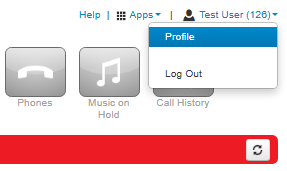
  2. Click on the Profile option in the user menu (top right of the screen).
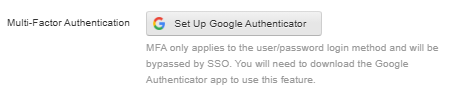
  3. Click Set Up Google Authenticator.
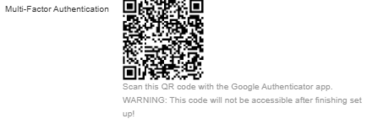
  4. Scan the 2D barcode
  5. Enter the passcode from your authenticator app into the Passcode field shown above.
  6. Enter your portal password in the Current Password field.
  7. Once this is done click on Save.