How to Block a Number from ALL Phones: Difference between revisions
Jump to navigation
Jump to search
No edit summary |
m (update) |
||
| Line 5: | Line 5: | ||
Tired of Robo-Callers? Tired of hearing about your cars non-existant extended lifetime warrenty? Add these callers to your blocked list! | Tired of Robo-Callers? Tired of hearing about your cars non-existant extended lifetime warrenty? Add these callers to your blocked list! | ||
= | = Block a Number from the Call History (Domain-Level) = | ||
# Log in to '''nova.vestednetworks.com''' | |||
# Click on the "'''Call History'''" tab. | |||
# Find the recent number you'd like to block (or click on the "'''Filter'''" button to search for the number).<blockquote>[[File:Block.14.png|frameless|835x835px]]</blockquote> | |||
# Click the "'''Block'''" icon (a circle with a line through it) on the far right of the call entry.<blockquote>[[File:Block.3.png|frameless|829x829px]]</blockquote> | |||
# In the confirmation popup, click the red "'''Yes'''" button to block the number.<blockquote>[[File:Block.4.png|frameless|616x616px]]</blockquote> | |||
= | = Manually Add a Blocked Number (Domain-Level) = | ||
# In the "'''Call History'''" tab, click the "'''Blocked Numbers'''" button at the top.<blockquote>[[File:Block.5.png|frameless|659x659px]]</blockquote> | |||
# Enter the number you want to block, click the '''plus sign (+)''' to add it. | |||
# Click "'''Done'''" to save your changes.<blockquote>[[File:Block.13.png|frameless|670x670px]]</blockquote> | |||
= | = Block a Number for a Specific User (User-Level or Routing User) = | ||
# Click on the "'''Users"''' tab at the top of the screen. | |||
# Click on the extension/user’s name in blue or the '''Edit''' icon.<blockquote>[[File:Block.8.png|frameless|755x755px]]</blockquote> | |||
# Go to the "'''Answering Rules"''' tab. | |||
# Click the "'''Allow / Block"''' button.<blockquote>[[File:Block.9.png|frameless|764x764px]]</blockquote> | |||
# Under '''Blocked Numbers''', type in the number you want to block. | |||
# Click the '''grey plus sign (+)''' to add it, then click "'''Done"''' to save.<blockquote>[[File:Block.12.png|frameless|755x755px]]</blockquote> | |||
Click | |||
=== Repeat as necessary === | === Repeat as necessary === | ||
Latest revision as of 15:17, 7 July 2025
This page is part of the NOVA Manager Portal section.
Tired of Robo-Callers? Tired of hearing about your cars non-existant extended lifetime warrenty? Add these callers to your blocked list!
Block a Number from the Call History (Domain-Level)
- Log in to nova.vestednetworks.com
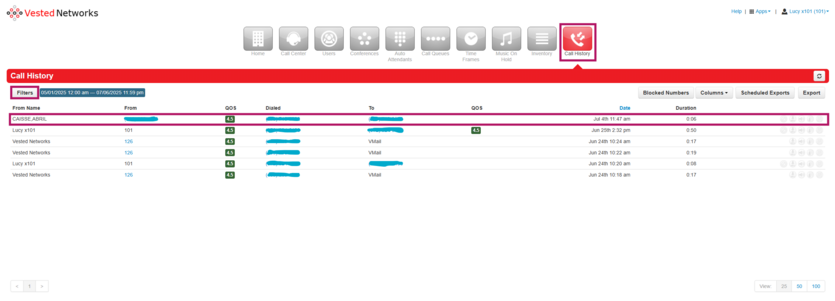
- Click on the "Call History" tab.
- Find the recent number you'd like to block (or click on the "Filter" button to search for the number).
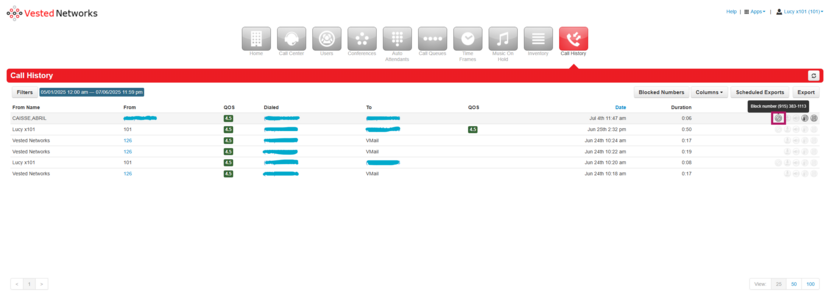
- Click the "Block" icon (a circle with a line through it) on the far right of the call entry.
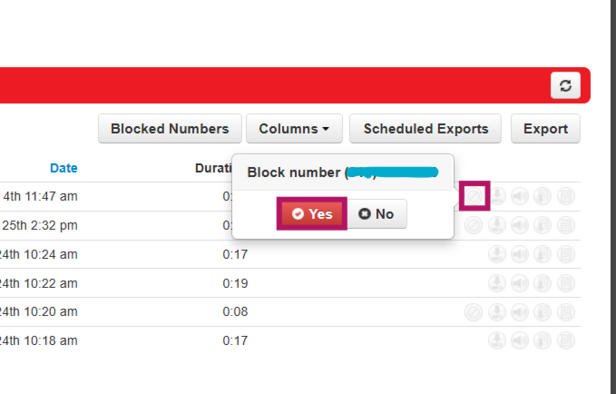
- In the confirmation popup, click the red "Yes" button to block the number.


Manually Add a Blocked Number (Domain-Level)
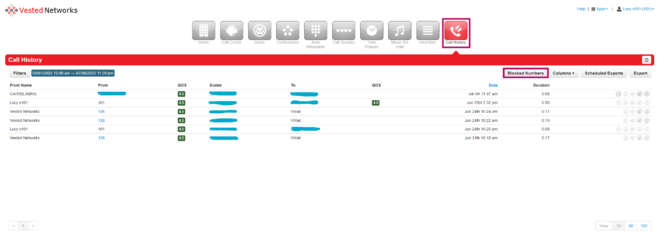
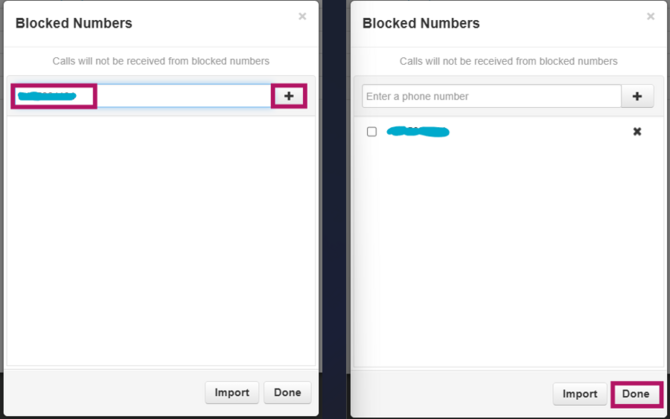
- In the "Call History" tab, click the "Blocked Numbers" button at the top.
- Enter the number you want to block, click the plus sign (+) to add it.
- Click "Done" to save your changes.


Block a Number for a Specific User (User-Level or Routing User)
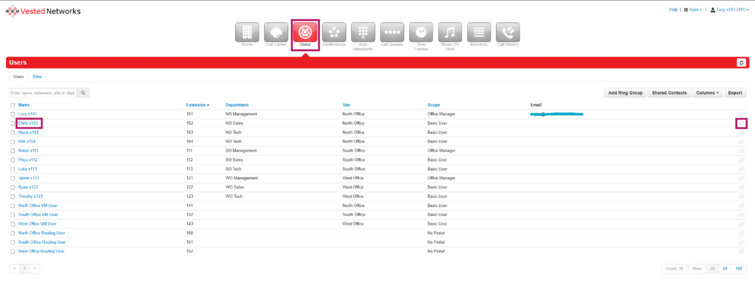
- Click on the "Users" tab at the top of the screen.
- Click on the extension/user’s name in blue or the Edit icon.
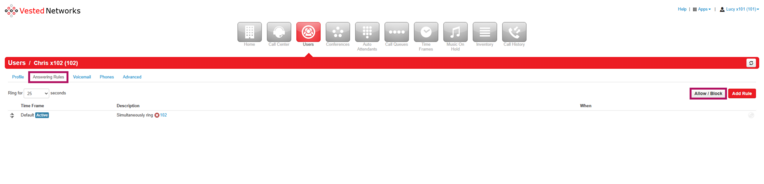
- Go to the "Answering Rules" tab.
- Click the "Allow / Block" button.
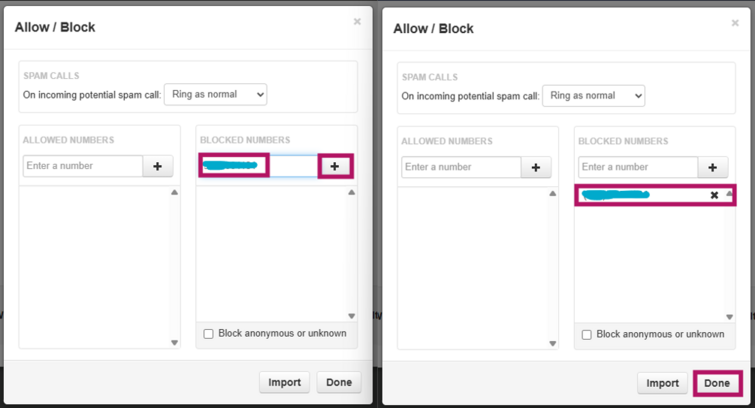
- Under Blocked Numbers, type in the number you want to block.
- Click the grey plus sign (+) to add it, then click "Done" to save.


Repeat as necessary
Now any time someone calls into your main number, the call will check the block list and reject any number add to it. You can as many numbers as necessary to the blocked numbers list.
If you have any questions about this process, or if you need assistance, please reach out to our Support Team by dialing HELP(4357) on your desk phone, calling (972) 924-6488, or submitting a ticket